

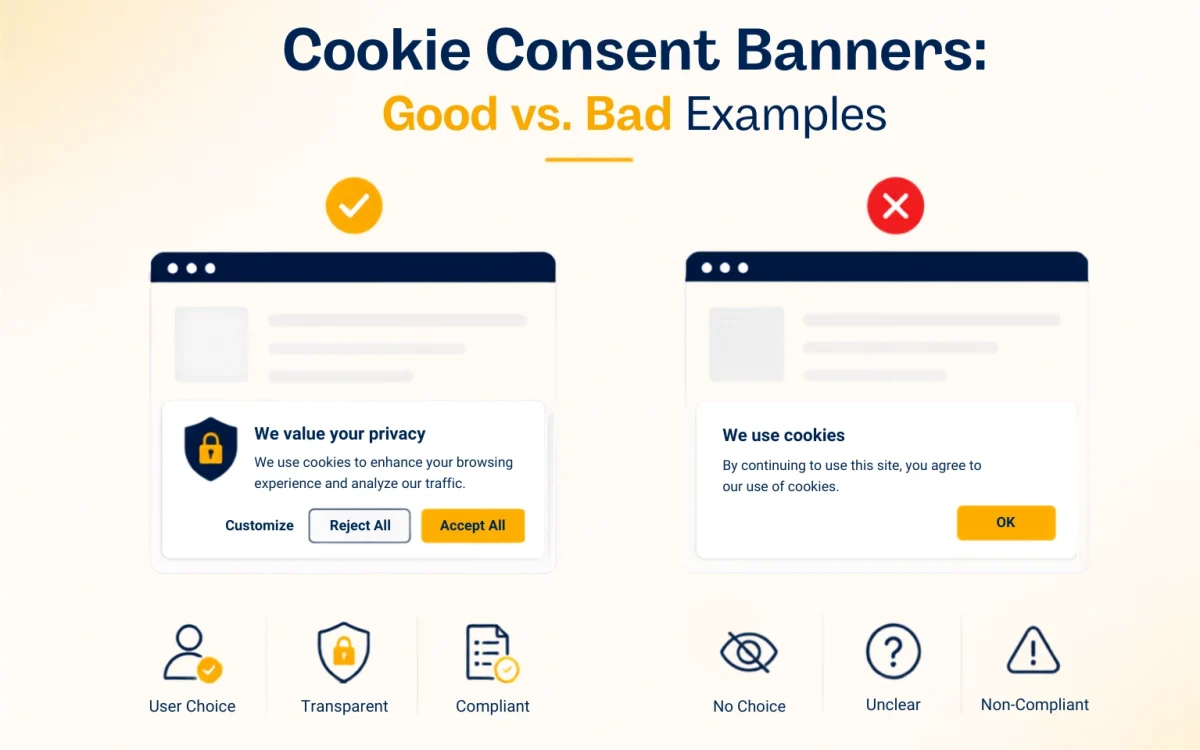
What Is a Cookie Consent Banner?
A cookie consent banner is a message displayed on a website to explain cookie use and, where required, ask visitors for permission to use non-essential cookies and similar tracking technologies.
If you’ve visited a website and seen options such as Accept All, Reject All, or Customize, you’ve already encountered one.
Some cookies support essential website functions, such as keeping users logged in or maintaining a shopping cart. Others may be used for analytics, advertising, personalisation, or tracking.
The challenge isn’t just displaying a cookie banner. It must give visitors clear choices, respect their decisions, and follow the privacy rules that apply to your website.
What Does a Good Cookie Consent Banner Look Like?
The best cookie banners are clear, easy to use, and honest about what happens when visitors make a choice.
Here are five practices worth following.
1. Make Accept and Reject Easy to Find
Imagine opening a website and seeing a large Accept All button, while the reject option is hidden inside several settings menus.
That’s frustrating, and it can undermine a genuine consent choice.
A better design makes accepting and rejecting optional cookies similarly straightforward wherever applicable rules require a genuine choice.
For example:
Accept All | Reject All | Customize
Visitors can make a quick decision or open the settings to choose individual categories.
2. Explain Why You Use Cookies
Avoid vague messages such as “We use cookies to improve your experience” without providing meaningful information about what that means.
Instead, explain the actual purposes of your cookies.
For example:
“We use necessary cookies to keep this website working. With your permission, we also use analytics and advertising cookies. You can accept all, reject optional cookies, or customise your preferences.”
Keep the first message short. Provide additional details in your cookie settings and cookie policy.
3. Remember the Visitor’s Choice
Nobody wants to reject cookies every time they open a new page.
A properly configured consent system should remember the visitor’s choice for an appropriate period and apply it consistently.
The banner may need to appear again when consent expires, the relevant settings change, or another valid reason requires a fresh choice. It shouldn’t repeatedly interrupt visitors simply because they rejected optional cookies.
4. Keep Cookie Settings Accessible
Visitors may want to change their minds later.
Add a visible Cookie Settings or Privacy Preferences link to your website footer or another accessible location.
This allows visitors to review or change their choices without searching through the website or clearing their browser data.
5. Keep the First Screen Simple
A cookie banner doesn’t need to contain your entire privacy policy.
Use a short explanation and clear buttons on the first screen. Put detailed category descriptions and individual preferences in a separate settings panel.
This layered approach gives visitors a quick way to decide while allowing those who want more control to explore their options.
Bad Cookie Consent Banner Examples to Avoid
Some cookie banners make it unnecessarily difficult to reject tracking. Others use confusing language or repeatedly interrupt visitors.
Here are six common problems to look for.
Hidden rejection options: Accepting takes one click, but rejecting requires several menus and extra steps.
Preselected optional cookies: Analytics or marketing categories are already switched on before the visitor makes a choice.
Guilt-based wording: Messages such as “No thanks, I don’t want a better experience” pressure visitors into accepting.
Repeated consent pop-ups: The banner keeps returning even after the website has recorded the visitor’s decision.
Cookie walls: Visitors are blocked from accessing content unless they accept certain cookies. These designs can raise significant legal concerns, depending on the circumstances and applicable rules.
Confusing legal language: Long, technical explanations make it difficult for visitors to understand what they’re agreeing to.
The problem isn’t simply that these designs look unattractive. They can also make consent less meaningful and create privacy compliance risks.
Good vs. Bad Cookie Banner Design
| What to check | Good cookie banner | Bad cookie banner |
| Accept and reject | Clear, accessible choices | Reject is hidden |
| Wording | Simple and specific | Vague or misleading |
| Optional cookies | Genuine choice | Preselected by default |
| Number of clicks | Straightforward choices | Unnecessary steps to reject |
| Saved preferences | Choice is applied consistently | Banner repeatedly returns |
| Cookie settings | Easy to find later | Buried in the website |
| Tracking behaviour | Respects consent choices | Optional tracking runs when it shouldn’t |
Use this comparison when reviewing your website. Don’t judge the banner only by its appearance. Check whether it actually respects the visitor’s decision.
Cookie Consent Banner Best Practices for 2026
A good design is only one part of the job. Your banner must also work correctly behind the scenes.
Follow these practical steps.
1. Identify your cookies. Scan your website for cookies, tracking pixels, analytics tools, and third-party scripts.
2. Categorise them correctly. Separate strictly necessary technologies from analytics, advertising, and other optional purposes. Check whether any legal exception applies.
3. Block tracking where required. Technologies that require prior consent should not run before that consent is obtained.
4. Adapt to applicable privacy laws. EU and UK cookie rules generally require prior consent for non-exempt technologies. California’s CCPA/CPRA focuses on applicable privacy rights, including opt-outs from the sale or sharing of personal information.
5. Respect withdrawal and opt-out choices. Make it easy to revisit preferences and ensure your website applies changes correctly.
6. Keep your cookie policy accurate. Explain the purposes of your cookies and provide relevant information about providers and durations where appropriate.
7. Test the complete experience. Check what happens before consent, after acceptance, after rejection, and after someone changes their preferences.
Remember, a cookie consent banner doesn’t guarantee compliance by itself. The scripts, settings, and consent records must work as intended.
What Should You Write on a Cookie Consent Banner?
If you’re creating a cookie banner for your website, start with clear wording rather than complicated legal language.
Here’s a simple example you can adapt.
We use cookies
We use necessary cookies to keep this website working. With your permission, we may also use analytics and advertising cookies to understand website usage and measure our marketing.
Accept All | Reject All | Customize
Your settings should explain the optional categories in more detail and allow visitors to make the choices required by applicable law.
Only use wording that accurately reflects your website’s tracking activities. Make sure the buttons work as described and that the relevant scripts respect the visitor’s choice.
How a Cookie Consent Management Platform Helps
Managing a cookie consent banner manually can become difficult when your website uses multiple plugins, analytics tools, and advertising integrations.
A cookie consent management platform (CMP) can help organise the process by providing features such as:
- Automated cookie scanning and categorisation.
- Customisable cookie consent banners.
- Consent-based script blocking.
- Regional consent settings.
- Consent records and preference management.
- Cookie policy tools and ongoing monitoring.
The exact features depend on the platform and its configuration, so check that it supports your website’s requirements.
Simplify Cookie Consent With CookieLet
CookieLet helps website owners manage cookie consent through tools designed to support scanning, consent controls, and ongoing monitoring.
Instead of relying entirely on manually maintained cookie lists, you can use a central platform to help identify tracking technologies and manage visitor preferences.
You should still review cookie classifications, configure the appropriate controls, and test the live website to confirm that visitor choices are respected.
Ready to improve your cookie consent banner? Explore CookieLet to see how its cookie consent management features fit your website.
Frequently Asked Questions
No. The requirement depends on the cookies and tracking technologies used, the location of your visitors, and the privacy laws that apply. Websites using non-essential tracking may need consent or other privacy controls, while technologies covered by applicable exemptions may be treated differently.
Where applicable rules require a genuine consent choice, rejecting optional cookies should be straightforward. Making acceptance easy while hiding rejection can undermine that choice. Check the specific requirements that apply to your website and visitors.
Preselected optional consent choices can be problematic because consent generally must represent a genuine, informed decision. Avoid assuming that visitors agree before they’ve made their choice, and assess your implementation against the relevant privacy rules.
The website may not be saving the visitor’s choice correctly, or its consent settings may be configured poorly. A banner can also reappear when consent expires or settings change. A properly configured system should apply recorded choices consistently and avoid unnecessary repeat requests.
Often, visitors can continue using a website while rejecting optional cookies, although the availability of certain features may depend on the service. Strictly necessary cookies may still operate where permitted. A website should not assume that every visitor must accept optional tracking.
Often, yes – particularly when the cookies you’re rejecting aren’t necessary for the basic operation of the website.
However, some websites may depend on particular technologies for certain features. Whether access can be provided without optional tracking depends on the site’s setup and the requirements that apply to it.
A cookie banner is the visible message that presents information and choices. A cookie consent management platform manages the broader process, potentially including cookie scanning, script blocking, preference storage, and consent records.
Improve Your Cookie Consent Banner
A good cookie consent banner doesn’t need to be complicated. It needs to explain cookie use clearly, offer meaningful choices, and respect the visitor’s decision.
Start by reviewing your current banner. Check whether visitors can reject optional cookies easily, find their settings later, and continue browsing without unnecessary interruptions.
Then test the technical setup to make sure your tracking tools behave as expected.
Want to make cookie consent easier to manage? Explore CookieLet and find a practical way to organise cookie scanning, consent preferences, and website tracking controls.
